.png)

What is conversational analytics? Learn how AI-powered marketing reporting works, and the five things to check before you trust the answers.
You open the dashboard, see that revenue moved, and still don’t know what to do about it. So you pull a second report, adjust the date range, export something to a spreadsheet, and 20 minutes later you have a guess. All you wanted was a straight answer and a next step.
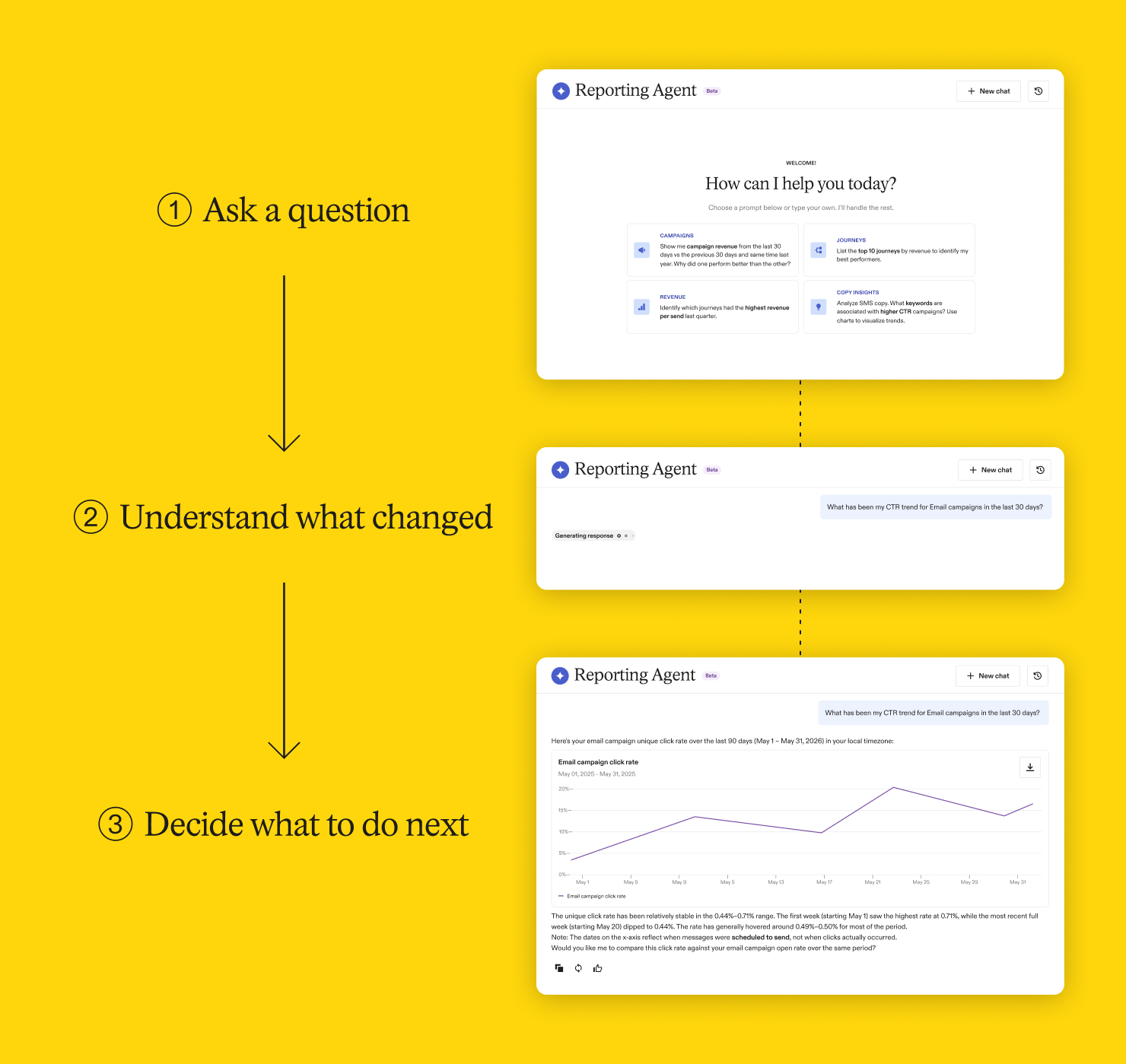
Marketing reporting is beginning to work that way. Instead of navigating to an answer, you now can ask for one in plain language and get back a number, a chart, and a view on what to look at next. If you’ve already tried this by pointing ChatGPT or Claude at your marketing data, you’ve seen part of it work and part of it fall short.
In this post, we cover what conversational analytics changes, why reporting is a higher bar than most AI use cases, the five things to check before you trust any AI reporting tool, and why the tool you choose changes the answer you get.
What is conversational analytics, and what does it change about marketing reporting?
Conversational analytics means asking a question in plain language and getting a usable answer back, rather than navigating menus and filters to assemble one yourself.
What is conversational analytics?
Conversational analytics lets a marketer ask a performance question in natural language and receive an answer, often with a chart, a comparison, and a suggested next step. The experience is closer to working with an analyst than pulling a static report.
The questions look like the ones you or a colleague would ask out loud:
- What were my top-performing campaigns last month?
- How did journey revenue change compared to the previous 30 days?
- Show me list growth by channel in a chart
- Why did performance change, and what should I look at next?
The value isn't that it's conversational. It's that the path from question to action gets shorter, and three shifts come with that:
- From “where do I find this?” to “what does this mean?”
- From “what happened?” to “why did it happen?”
- From “what should I report?” to “what should I do next?”
The third one is where the time goes. Most reporting work is deciding what the number is telling you.
Why AI reporting is a high-trust use case
Here's the part that decides whether any of this gets adopted.
Marketers will take an imperfect first draft of campaign copy and fix it. They will not take an answer that misstates revenue, conversion rate, or campaign performance. Those are two different tolerances for the same technology, and reporting sits on the demanding side of the line.
A fast answer that's wrong creates more work. The cost there is optimizing the wrong campaign, misreading customer behavior, or carrying a bad number into an executive update and finding out later. Which is why nobody retires their dashboard on a promise of speed. Speed is what makes conversational analytics appealing. Accuracy is what makes anyone willing to use it twice.
5 things to check before you trust AI reporting
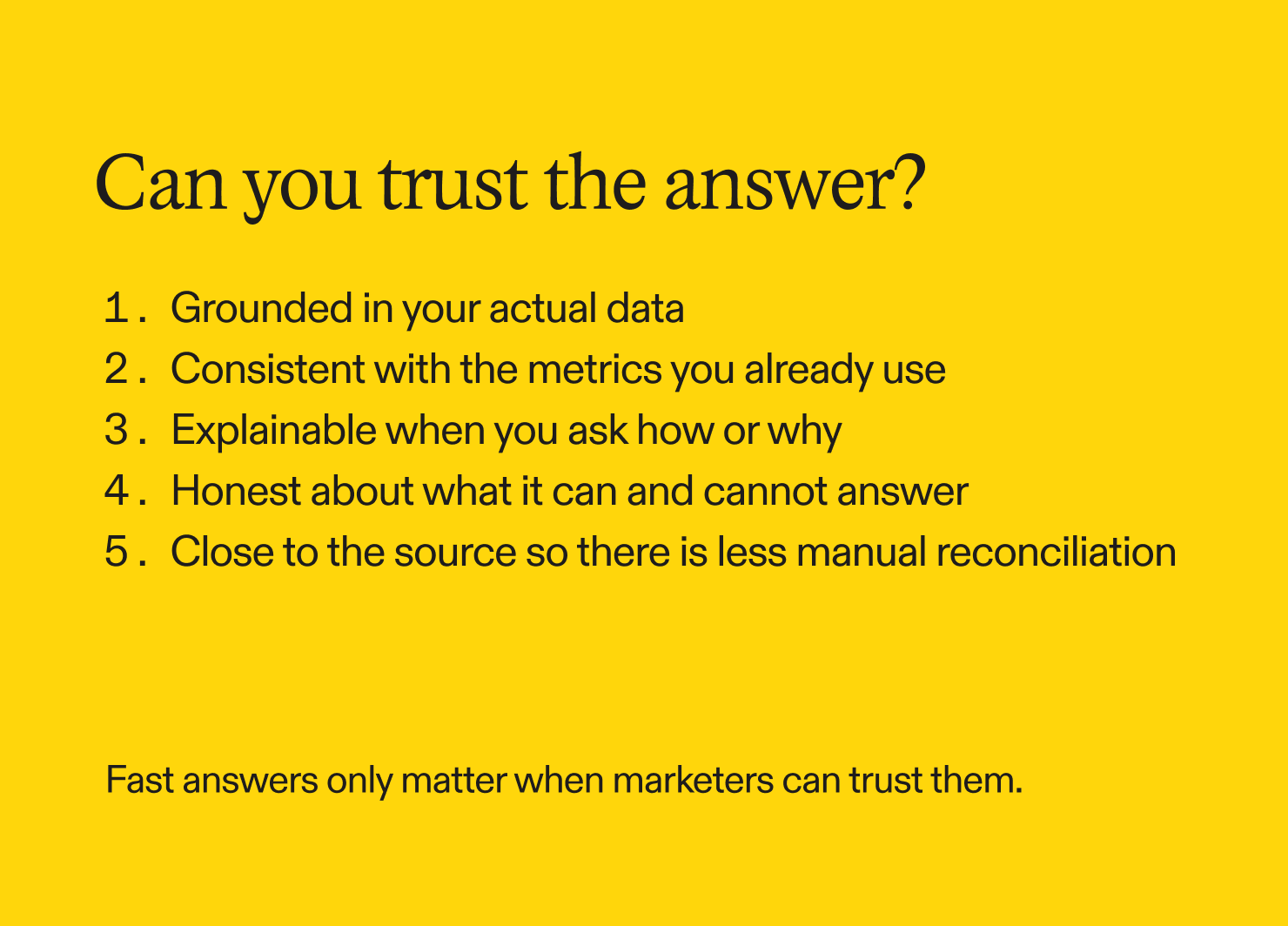
Before you act on an AI reporting answer, run it through five checks. They apply to the answer itself, not to the tool that produced it.
1. Grounded in your own data. Answers should be drawn from your platform data rather than generated to sound plausible. In reporting, an invented answer is more dangerous than no answer, because it arrives looking authoritative.
2. Consistent with the metrics you already use. Revenue, click-through rate, conversion rate, and attribution should match the definitions in your reports. Small discrepancies cost confidence faster than large ones, because they're harder to catch and easier to carry into a decision.
3. Explainable when you ask how or why. You should be able to ask how a number was calculated and why the tool reached its conclusion, then inspect the assumptions underneath it.
4. Honest about what it can and cannot answer. A tool that says it doesn't have the data is worth more than one that always produces something. Declining to answer is a feature.
5. Close to the source. The further a tool sits from your data, the more exporting, reconciling, and validating lands on you. Working inside the platform means fewer gaps to close by hand.
A general AI tool can clear some of these checks, including the first and the fifth. What it won’t have is the instinct a marketer brings to the question: which metrics matter for a campaign versus a journey, and which comparison to reach for next. A tool built for marketing performance analysis starts from those assumptions instead of waiting to be told.
One more thing a good tool does: when it names likely drivers behind a change, it presents them as areas to investigate rather than settled causes. Performance rarely has a single clean explanation, and a tool that offers you a starting point for investigation is more useful than one that hands you a verdict.
Pro tip
Run your first few questions against something you already know the answer to. Pull a number you reported last month and ask for the same thing. You'll learn quickly whether the metric definitions line up, and you'll learn it before anything is riding on the answer.
Why two AI tools can give you different answers from the same data
You can reach the same Attentive data two ways: through a general-purpose AI tool connected over MCP, or through Reporting Agent inside the platform. A tool on the other end of MCP works from your Attentive numbers alone, without Reporting Agent’s analysis behind it, so its conclusions are its own. That’s how two tools reading identical numbers can hand you different answers.
A general-purpose AI assistant is designed to reason across a huge range of topics. When it looks at marketing performance data, the explanation you get depends on the model, the prompt, and whatever context it happens to have. The numbers may come from Attentive, but the conclusions are the assistant’s, and they aren’t Attentive-verified insights.
Reporting Agent is built for the marketing question, not the general one
You ask about your program in plain language and get answers, charts, takeaways, and recommendations without leaving Attentive, grounded in supported Attentive performance data. That covers the first and fifth checks by construction: the data is yours, and there’s no export step between the question and the answer.
It’s also built around how marketers actually evaluate campaigns, journeys, audiences, and revenue, so it knows how Attentive metrics are defined and how performance data fits together across the platform. That matters most once you move past what happened and start asking why it happened or what to do next. Its root cause analysis helps you investigate changes across campaigns, journeys, channels, and lists, with drivers presented as areas worth examining rather than conclusions. Its recommendations point toward where to focus, which keeps the decision with you.
“When it comes to data, I don’t just need answers. I need answers I can trust. That’s what stands out to me about the Attentive Reporting Agent—I have confidence in what it’s telling me.”
— Aaron Aubertin, Digital Performance Analyst at In Social
General AI tools still have an important role. Reach for one when you want to combine Attentive data with information from other systems, conduct broader analysis, or explore strategy outside the platform. When the question depends on understanding Attentive performance, Reporting Agent is the better place to start.
What conversational analytics changes in marketing reporting, and why dashboards still matter
Dashboards will keep doing what they’re good at: structured, recurring reporting that everyone reads the same way.
What changes is where exploration happens. Conversational analytics becomes the faster path for the follow-up question, the diagnosis, and the decision about where to spend your attention this week.
Most marketing teams already have agents doing individual jobs: one growing the list, one shaping journeys, one answering questions about performance. The step after that has less to do with any single agent and more to do with what happens when they work from the same picture of your customers and your program.
Which is when the five checks above start mattering most. An answer you can’t verify is a nuisance when one tool produces it. It’s a problem when several are working from it.
AI can make analytics faster. Trust is what makes it usable.
Join the Reporting Agent beta


.png)
.png)