

Lifecycle marketers turn insights into campaigns, operators cut manual quality checks, leaders connect messaging to revenue, and agencies standardize client work.
AI is becoming a second workspace for marketing teams. Marketers are already using it to brainstorm, summarize, write copy, read data, and plan what's next. The ceiling on all of that is access: an assistant with no connection to the systems where marketing happens can only work with what you hand it.
MCP, or Model Context Protocol, removes that ceiling. It's an open standard that connects an AI assistant to outside tools and data, which moves a team from asking questions to having the work staged for review. What that's worth depends entirely on the job you do. A lifecycle marketer and a marketing operator are looking at the same connection and reaching for different things through it.
In case you missed it, we have an overview of what MCP is and how a governed setup works. In this post, we'll cover MCP use cases across four roles: lifecycle marketing, marketing operations, ecommerce leadership, and agencies. The examples come from brands using Attentive MCP in open beta.
1. For lifecycle marketers: from performance insight to campaign action
Lifecycle marketers carry strategy and execution at the same time. They need to know what worked, turn that into the next campaign, aim it at the right audience, and keep journeys current. The information required to do that sits across reports, campaign history, journey data, creative performance, and customer behavior, which means the first hour of the work is usually assembly.
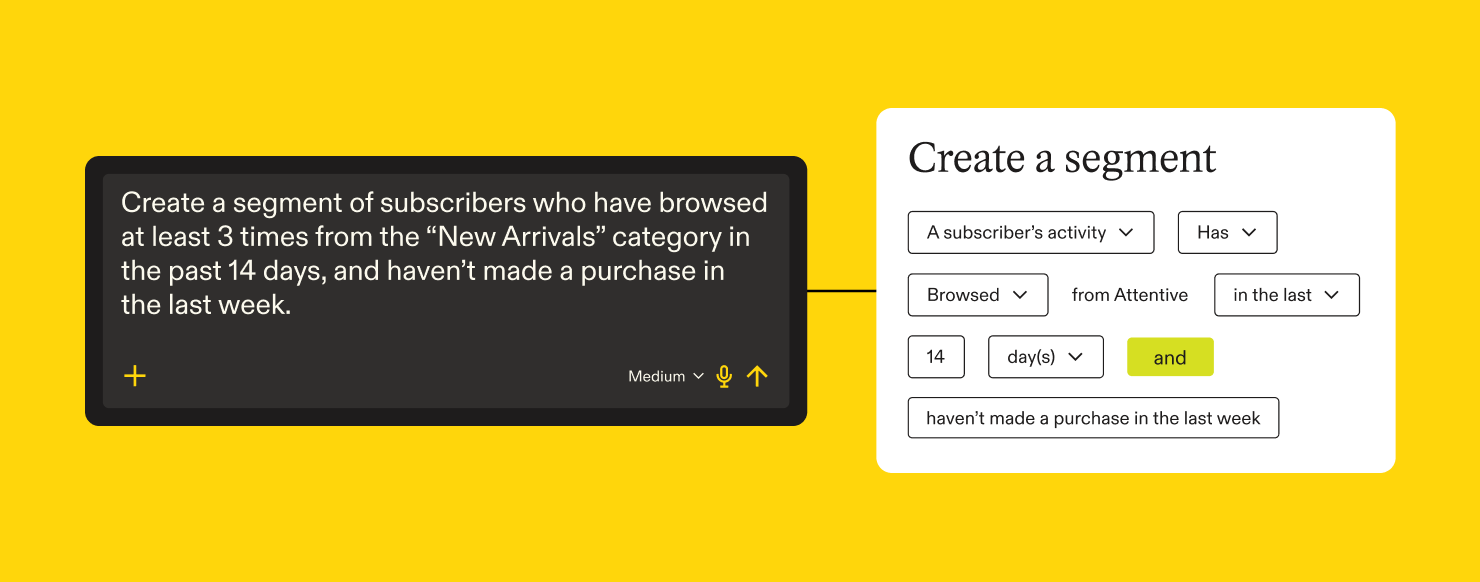
MCP shortens the distance between insight and action. Instead of pulling past results, rereading message copy, and rebuilding audience logic by hand, you can ask your assistant to analyze performance, find the pattern, and help prepare the next campaign, segment, or journey update.
That matters because lifecycle marketing is iterative. Strong teams aren't launching one campaign at a time, they're learning from every send and every journey touchpoint. MCP makes the loop turn faster.
What lifecycle marketers use it for:
- Drafting email and SMS campaigns from approved briefs
- Building and refining audience segments
- Creating, inspecting, and editing lifecycle journeys
- Pulling reporting to see which creative, offer, or channel performed best
- Comparing performance across launches, offers, products, or audience groups
- Turning prior campaign learnings into new testing ideas
From the beta
Leading health and wellness brand: connected campaign copy, product links, and performance data to guide future launch angles and product-category planning. That ties creative decisions to outcomes, so the next launch angle comes from what performed rather than from a guess.
Premium beverage marketplace: designed a lapsed-buyer winback journey with branching, exclusions, and a holdout. Winback programs live or die on logic: who qualifies, who gets excluded, how channels sequence, and how you measure incrementality. This is lifecycle strategy translated into a reviewable journey structure, not a one-off campaign.
Sports retail brand: mapped storefront signals to lifecycle journey logic. Lifecycle programs often depend on behavior happening outside the messaging platform, like signup source, product interest, or back-in-stock activity. Connecting those signals to journey logic is how customer behavior becomes relevant messaging.
Prompt to try
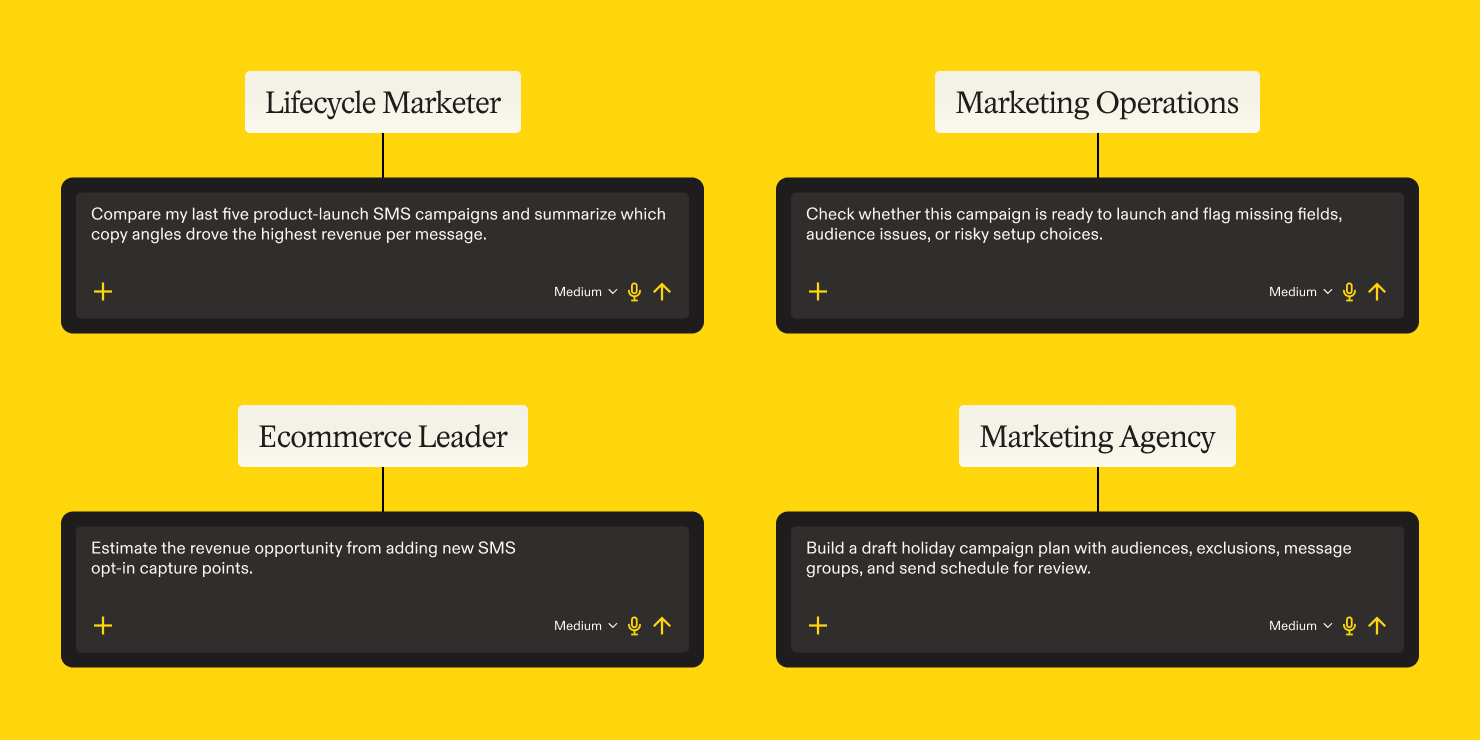
“Compare my last five product-launch SMS campaigns and summarize which copy angles drove the highest revenue per message.”
2. For marketing operators: less manual QA, more confident launches
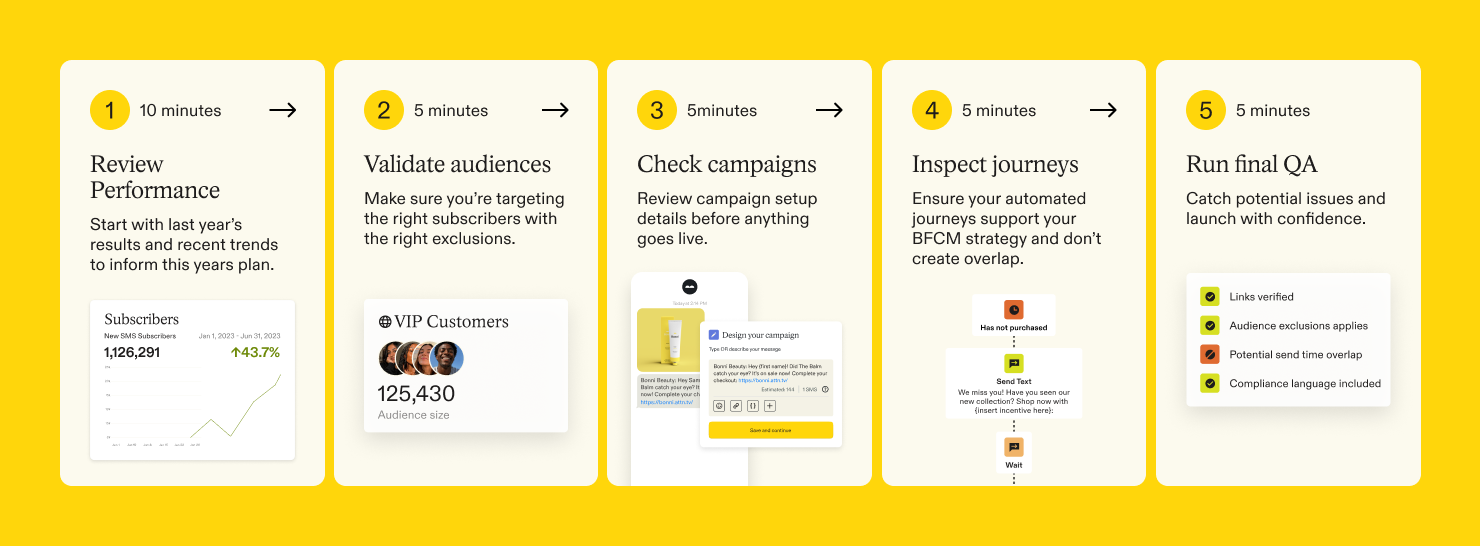
Marketing operators own whether a campaign is accurate, compliant, and ready. The work is repetitive by nature: confirming audiences, exclusions, links, timing, suppression rules, message collisions, journey logic, and naming conventions. Every one of those checks matters, and every one is easy to skip when the calendar is tight.
MCP turns an AI assistant into a setup and QA partner. It can gather configuration details, inspect how a campaign or journey is built, flag what looks wrong, and support a repeatable review process. Less time confirming details by hand, more time improving the system that produces them.
This pays off most for teams with high campaign volume, complex segmentation, several channels, or agency support, where the number of things to check grows faster than the time to check them.
What operators use it for:
- Validating campaign and journey setup before launch
- Checking audience logic, links, exclusions, timing, and suppression rules
- Auditing signup units, journey overlap, and message collisions
- Building repeatable workflows for recurring campaigns and lifecycle updates
- Retrieving campaign, segment, and journey configuration details
- Standardizing QA prompts for launch checks
From the beta
Automotive lifestyle brand: audited SMS send frequency and identified double-send collisions. Frequency and collisions land directly on the customer, and they're among the hardest problems to catch by hand once several campaigns and journeys are running at once.
Paper crafting brand: checked abandoned-cart coverage before adding another remarketing system. That's preflight analysis before adding complexity: understanding what's already covered, where the gaps are, and whether something new would overlap what exists.
Sport apparel brand: audited signup eligibility configuration. Acquisition setup hides issues that affect list growth and compliance without announcing themselves, and reviewing whether the right visitors are eligible for the right capture units is the kind of check that rarely gets scheduled.
Prompt to try
“Check whether this campaign is ready to launch and flag missing fields, audience issues, or risky setup choices.”
Pro tip for operators: Save your QA prompts and reuse them. The value compounds when the same check runs the same way every launch, which is harder to guarantee when each person writes their own version from memory.
3. For ecommerce leaders: see how messaging drives growth
Ecommerce leaders need messaging to connect to revenue, retention, and acquisition. Their questions sit above individual campaigns: Are we growing the subscriber base efficiently? Are lifecycle programs driving incremental revenue? Is send frequency helping or hurting margin? Where should the next dollar go?
Answering those means reading messaging data alongside ecommerce revenue, acquisition sources, paid media, site behavior, and customer cohorts. MCP brings that performance data into the broader analysis, which makes it easier to connect messaging activity to business results.
Leaders don't need more reports. They need a faster path to what changed, why it matters, and where to look next.
What leaders use it for:
- Pulling messaging performance into broader revenue reporting
- Analyzing subscriber growth, churn, acquisition, and retention
- Evaluating promotion strategy, send frequency, and incremental return
- Building business cases for new capture points, lifecycle programs, or channel investment
- Comparing message performance against ecommerce trends
- Supporting budget planning and channel investment decisions
From the beta
Large apparel brand: explored a daily retention analyst agent and scheduled performance dashboards. That's executive visibility on a recurring basis: daily views of retention, campaign activity, journey performance, and anomalies, without waiting on manual analysis.
Outdoors retail brand: analyzed subscriber churn cohorts and built a business case for new opt-in placements. Understanding when subscribers churn, and what new capture points could be worth, turns a growth proposal into an argument with numbers behind it.
Home decor brand: evaluated MMS lift against incremental messaging costs. Leaders need to know whether a tactic performs and whether the extra cost earns its place, which is a profitability question more than a performance one.
Specialty craft brand: pulled billable spend for contract planning. Useful beyond campaign work, into budgeting, vendor conversations, and commercial decisions.
Prompt to try
“Estimate the revenue opportunity from adding new SMS opt-in capture points.”
4. For agencies: manage client work faster, with control
Agencies run complex programs across many clients, each with its own calendar, audience strategy, creative requirements, reporting needs, and approval process. The work repeats, but the context changes every time, which puts pressure on speed and consistency at once.
MCP gives agencies a way to standardize how AI shows up across client work. Teams can audit existing setups, turn briefs into campaign drafts, compare performance, build journey plans, and run repeatable QA. Faster delivery, with strategy, review, and client approval still in place.
The value here is scale. AI Pro and MCP together let a team apply its expertise across more campaigns and clients without rebuilding setup or redoing analysis each time.
What agencies use it for:
- Auditing client campaigns, journeys, segments, and signup setup
- Turning client briefs into draft campaigns and journey plans
- Comparing creative performance across campaign types
- Standardizing prompt-driven workflows for QA, reporting, and launch planning
- Creating reusable campaign production processes
- Supporting faster onboarding and account reviews
From the beta
Ecommerce agency: coordinated a holiday campaign production workflow across cohorts, exclusions, campaigns, message groups, links, experiments, and send schedules. Holiday campaigns are operationally dense and time-boxed, and organizing that many moving pieces into one reviewable plan is where the hours go.
Activewear brand's agency partner: connected exact SMS offers and copy to click-through rate and revenue. Tying specific creative choices to performance is what makes a recommendation defensible in a client conversation, and what tells you which messages to repeat, refine, or retire.
Personal care brand: turned campaign assets and templates into editable email drafts. Agencies spend a lot of hours translating client inputs into production-ready assets, and shortening the path from template to editable draft leaves more room for creative review.
Prompt to try
“Build a draft holiday campaign plan with audiences, exclusions, message groups, and send schedule for review.”
The common thread is speed with control
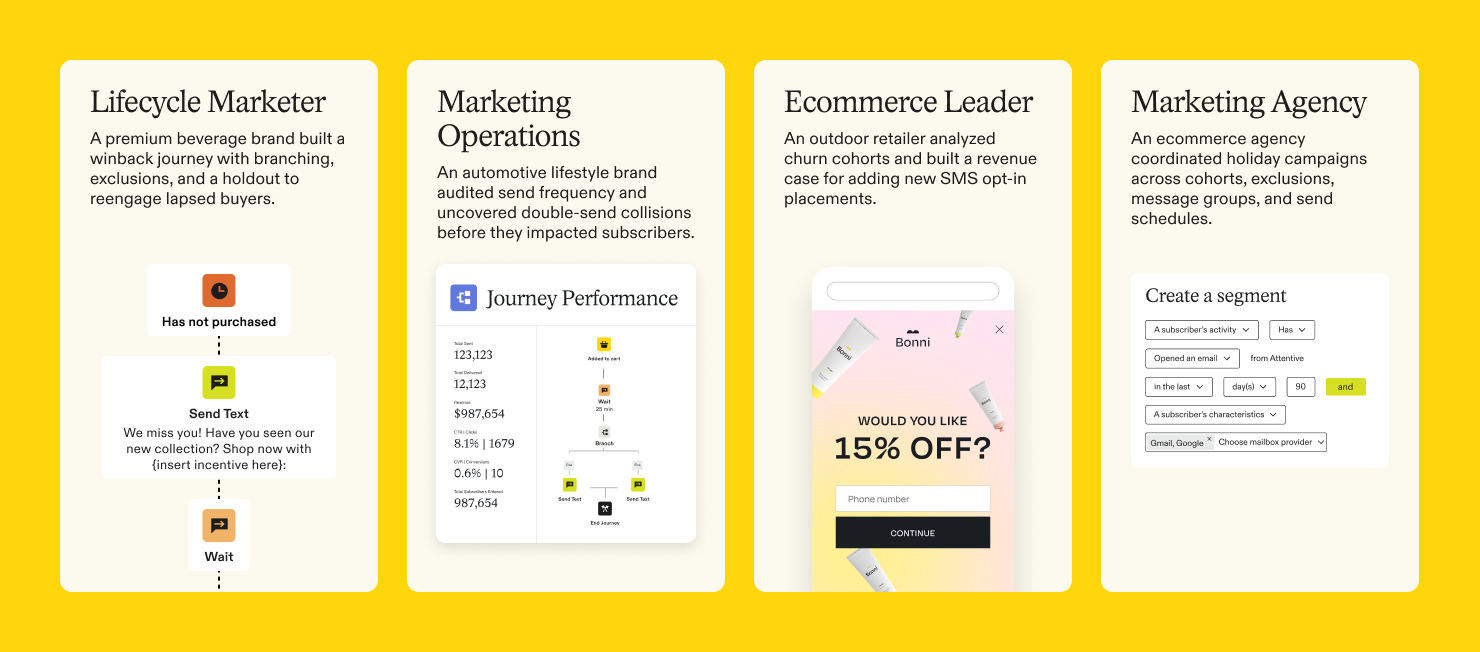
Four roles, four sets of questions, one connection underneath. Lifecycle marketers move from insight to campaign. Operators cut manual checking. Leaders connect messaging to business outcomes. Agencies scale what they know across more accounts.
What ties them together isn’t AI but the governance system used to understand performance, prepare work, validate setup, and move faster through the workflows that produce results, with decisions still sitting with the people accountable for them.
Pick the role closest to yours and start with the prompt in that section.
.png)
.png)