.png)

Going live is an important milestone. What you do next determines how much value you get from the move.
By the time an email migration is complete, your team has done a lot of work just to get live.
So it's understandable to want to settle in.
And for a little while, that's exactly what you should do. Make sure the program is stable. Give deliverability time to settle. Learn how the new platform behaves.
But getting live and getting more from your new platform are two different milestones.
We spoke with experts across implementation, adoption, customer solutions, product, and deliverability about what they see from brands after migration. The teams that get more value aren't necessarily the ones that change everything fastest. They're the ones that stay engaged: learning from what worked before, finding the right places to improve, and gradually putting more of the new platform to work.
Siera Gallien, Senior Adoption Consultant at Attentive, sees that engagement as one of the clearest differences between teams that simply get live and those that continue improving their programs after launch.
{{lemon-one}}
1. Stabilize your email program after migration
A new platform creates plenty of opportunities to make changes. You don't have to make all of them immediately.
The first priority is understanding how your existing program is performing in its new environment. Make sure core journeys are running as expected, data is flowing correctly, reporting makes sense, and your sending patterns are stable.
Start with what you already know
Migration doesn't erase everything your team learned on the previous platform.
Siera recommends looking at the strategies and tests you've already run and using those lessons as a starting point. If your team spent months testing something on your previous platform and consistently learned that it didn't work, moving to a new ESP isn't necessarily a reason to run the same test again. Your past performance gives you useful context for deciding what deserves attention next.
That applies to the things that worked, too. Establishing a baseline isn't about recreating every number from your previous platform. It's about understanding where the program stands so you can make informed decisions about where to go next.
Give deliverability time to settle
Deliverability deserves similar patience.
Ed Chun, Senior Product Manager at Attentive, recommends looking at multiple signals together—delivery, opens, clicks, bounces, unsubscribes, and spam complaints—rather than relying on one metric to tell you whether everything is healthy. A strong delivery rate alone, for example, doesn't necessarily mean subscribers are engaging or that overall deliverability is performing as expected.
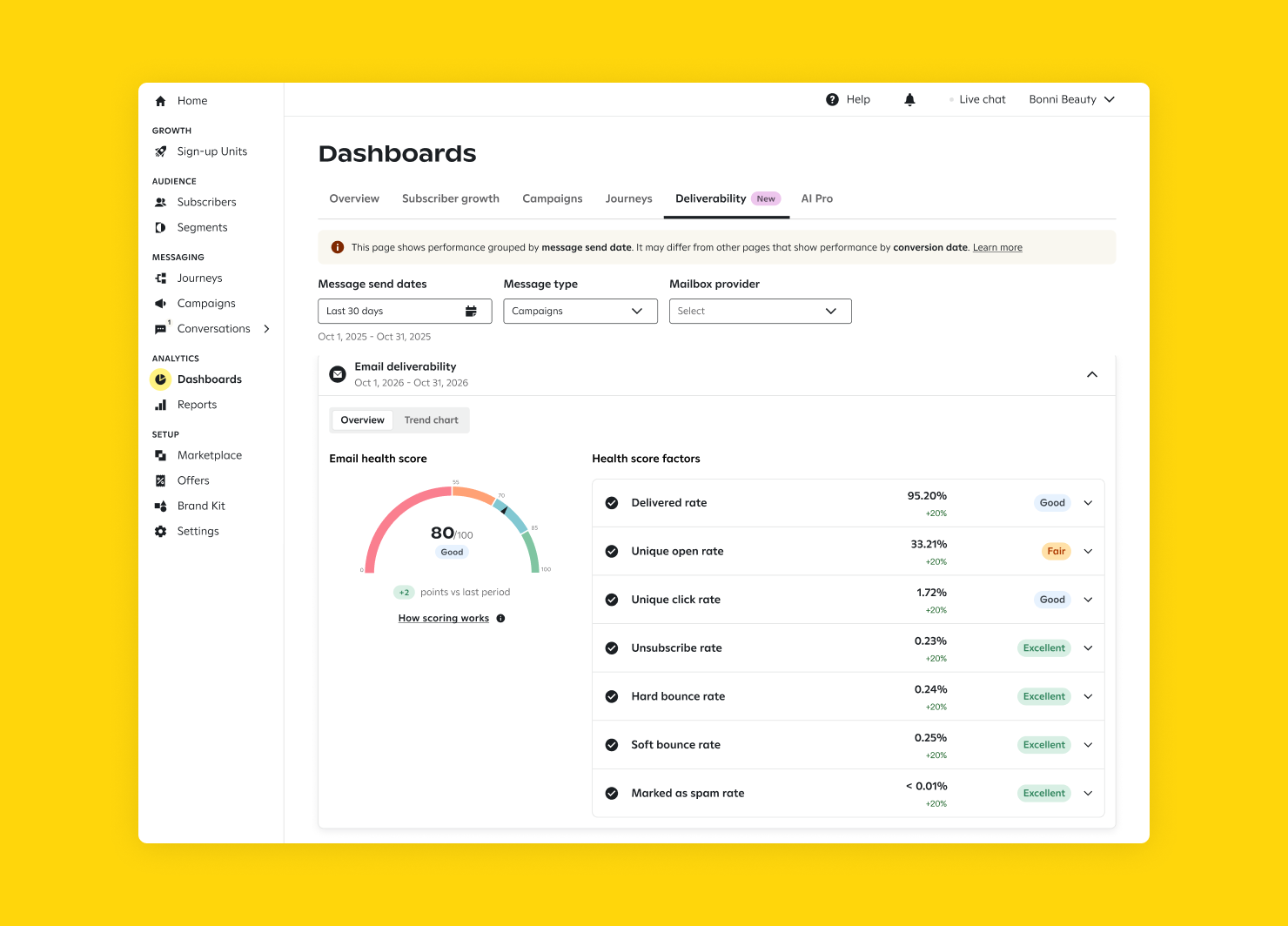
Maintaining a healthy sending cadence after warm-up matters, too. Large, sudden changes can disrupt the sending reputation you've just worked to establish.
There's no universal number of days you need to wait before making a change. The point is to give yourself enough information to understand what's normal before reacting to it.
You need multiple metrics to tell the whole story.
— Ed Chun, Senior Product Manager
Once the foundation feels stable, you can start looking for the places where improvement could matter most.
2. Focus first on the opportunities that matter most
It's natural to gravitate toward the biggest numbers in your program.
The campaign with the largest audience. The journey with the most sends. The program generating the most total revenue.
Those numbers matter, but they don't always tell you where the greatest opportunity is.
Clayton Mamele, Manager, Implementation at Attentive, encourages teams to consider how close a program sits to the revenue source. A welcome journey may reach a large audience, while a lower-volume cart or checkout abandonment journey reaches customers much closer to making a purchase. That proximity can make it a more meaningful place to focus optimization efforts.
How close to the revenue source are you, and what are your guiding metrics?
— Clayton Mamele, Manager, Implementation
Our team often sees early gains in journeys after migration. Sometimes that means improving what already exists—like expanding an abandonment journey that previously had only one touchpoint. Other times, it's activating journeys the brand wasn't running at all on its previous platform, such as checkout or session abandonment.
The right opportunity will vary by business. For one brand, checkout abandonment may sit closest to conversion. For another, browse behavior may be a stronger indicator of purchase intent. Understanding your own funnel helps you decide where additional attention is most likely to pay off.
Triggered email is one place those gains may become visible quickly. Craig Melville, Manager, Adoption Consulting at Attentive, says it's often one of the first places he sees a meaningful performance difference after migration because better customer recognition can allow more shoppers to qualify for the journeys a brand already has running.
The opportunity isn't simply to send more email. It's to reach more of the right customers at moments when their behavior gives you something useful to respond to.
3. Use what you know about your customers to improve email segmentation
Better customer recognition creates an obvious benefit: more of the people visiting your site become people you can actually reach.
But that's only part of the value.
Daniel Eisenhut, VP, Customer Solutions at Attentive, points to what happens once more customer behavior can be connected to a known profile. Marketers gain more context for segmentation, content, and campaign decisions rather than treating the same person as disconnected records or an unknown visitor.
That additional context can help with practical decisions marketers make every day: who should receive a message, when should they receive it, and what do we know about where they are in the buying journey?
Segmentation is one of the most immediate places to put that context to work. Better recognition can help teams understand where customers are in the funnel, which behaviors signal stronger purchase intent, and how to reach people without over- or under-messaging them.
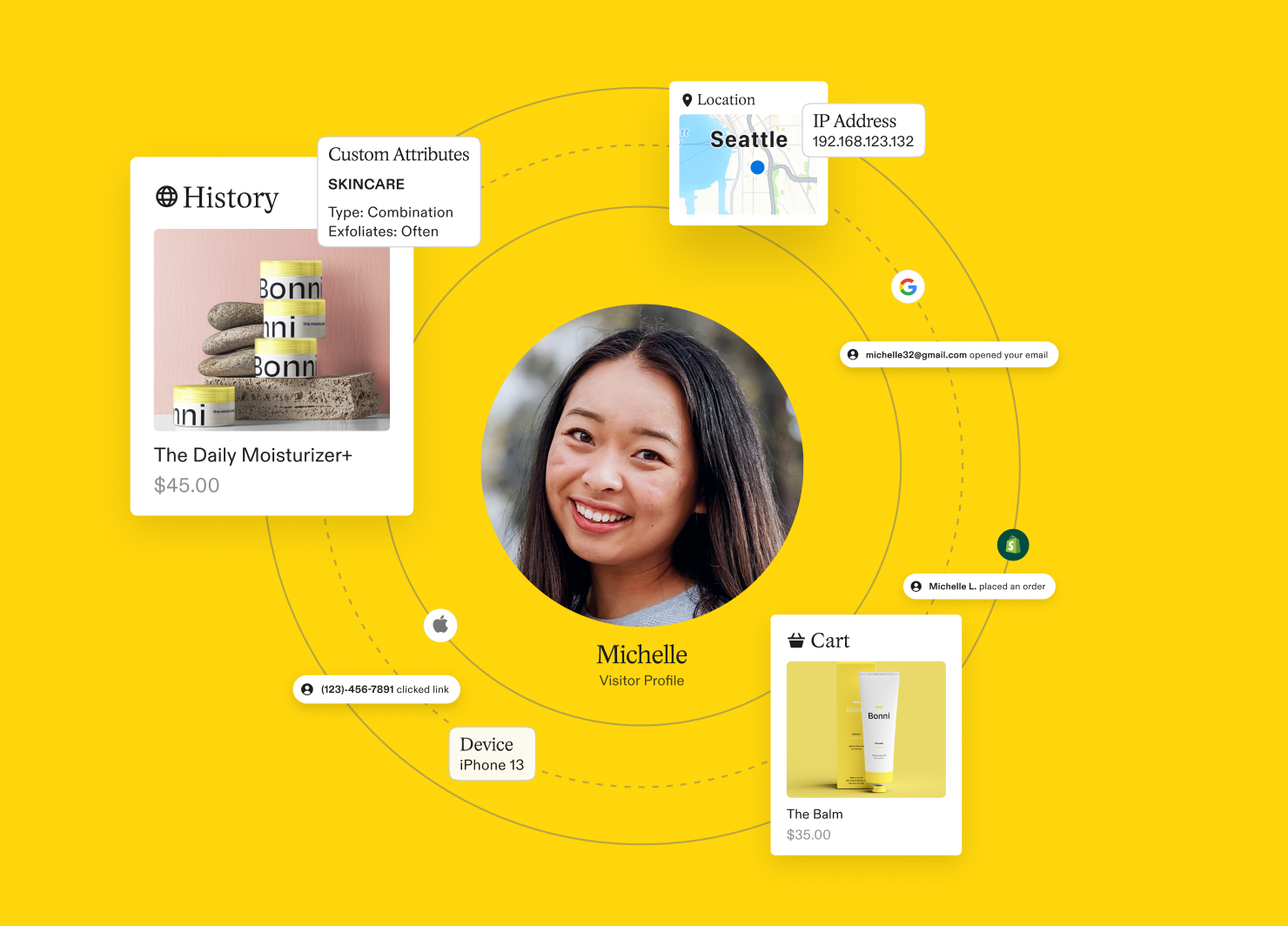
The value extends beyond any single campaign or journey. Data collected through signup experiences, surveys, customer behavior, and custom attributes can inform what happens next across the program.
We recommend looking at those capabilities together—connecting signup units, Identity, customer attributes, and journeys rather than treating each as a separate tool.
The more complete the picture of the customer becomes, the more useful that information can be throughout the program.
4. Use your new platform to simplify how you work
Some amount of parity is necessary during a migration. The programs your business depends on need to keep running.
But parity doesn't have to become permanence.
Over time, marketing teams naturally build processes around the technology available to them. Some will still make perfect sense on the new platform. Others may exist because the old platform required them.
One brand, for example, entered its migration with roughly 300 existing audience segments and initially planned to recreate them all. Many weren't actively being used. With newer ways to understand and group customers, the team didn't necessarily need to maintain hundreds of manually built segments simply because that's how the program had operated before.
Similar opportunities can appear in your journeys. Craig shared an example of a brand that had been manually sending campaigns when products came back in stock because automating that experience in its existing system was difficult. A workflow that once required ongoing intervention could instead be handled as an automated journey.
Before adding more work to your new platform, there's one question worth asking:
What could be simpler now?
It might be a segment you no longer need to maintain. A campaign that can become a journey. A reporting process that can be shortened. Or a handoff between systems that no longer needs to happen at all.
A migration gives you a rare opportunity to notice the work your team has learned to accept—and decide which parts are still worth doing.
5. Automate the work that doesn’t need to be manual
Simplifying existing processes is one opportunity. The next is deciding where the platform itself can do more.
Start with the work you do repeatedly
Reporting is a good example.
One member of our team remembers spending the first hour or two of each day going through reporting for clients. Today, that work doesn't have to happen in the same way. For marketers, reducing that kind of repetitive analysis creates more room to understand what the numbers mean and decide what to do about them.
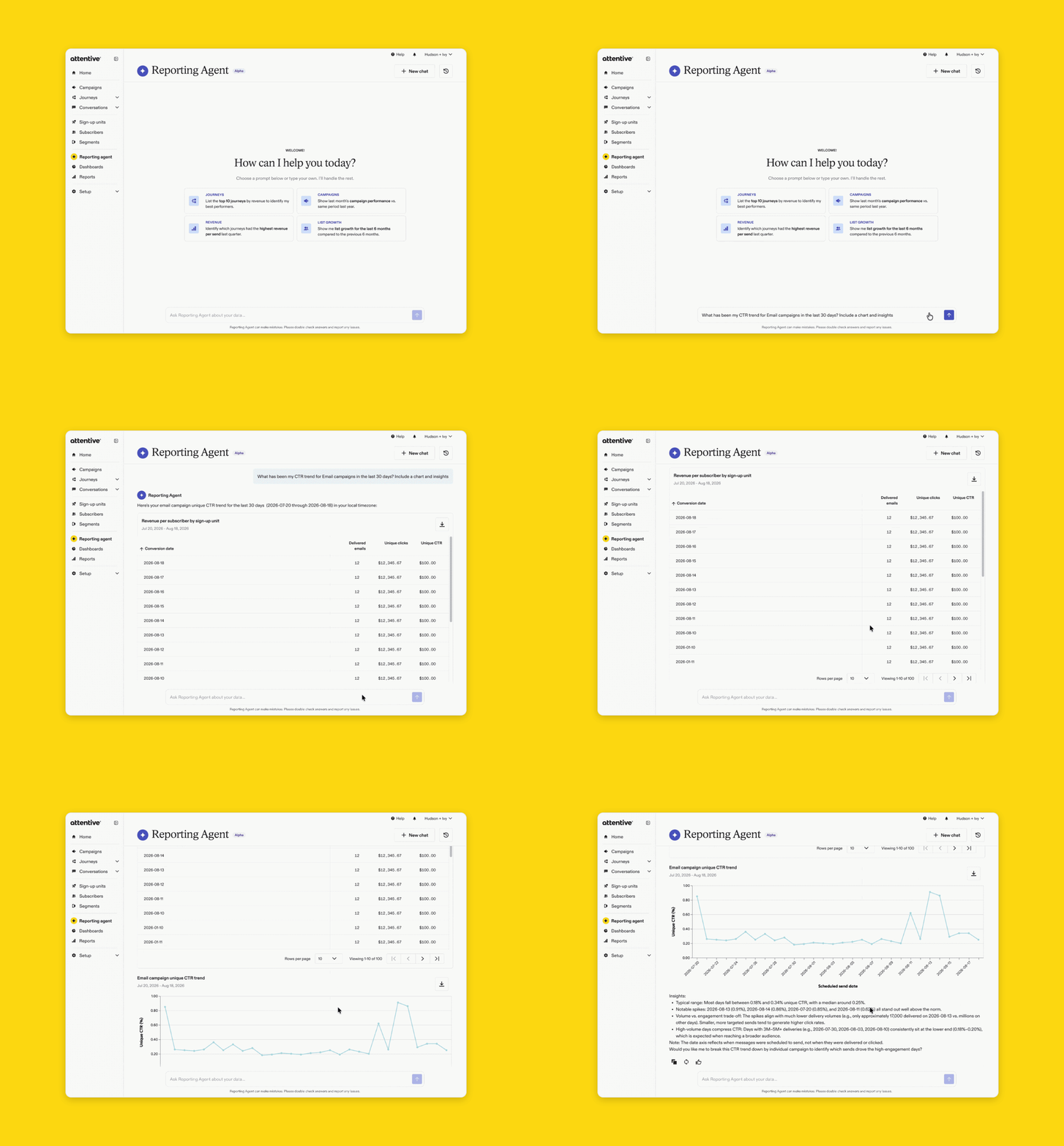
The same principle can apply to audience selection, segmentation, send timing, content creation, and other recurring parts of the job.
This is also where AI can become useful—but the value isn't in being able to say you're using AI.
Shoshana Antunes, Senior Product Marketing Manager at Attentive, sees a stronger opportunity in using AI to help marketers improve business outcomes. She points to practical applications such as generating email templates and subject lines, answering reporting questions more easily, and using customer-value signals to identify audiences worth re-engaging.
Ed similarly points to AI-assisted audience selection and customer identification as ways marketers can make decisions more directly connected to revenue.
Keep the marketer in the driver's seat
We've also heard hesitation from marketers who aren't sure what greater use of AI means for their own role.
That's understandable. The marketer is still the gatekeeper. AI can help identify audiences, inform send timing, support segmentation, and make customer lifecycle information easier to use, but the marketer still provides the judgment and strategy behind those decisions.
The goal isn't to hand the program over to a tool. It's to give your team better information, reduce work that doesn't require human judgment, and create more time for the decisions that do.
6. Connect email and SMS around the customer journey
Having email, SMS, and push in the same platform creates convenience.
Having them work together creates something more useful.
Once the foundation is in place, look for opportunities to connect channels, journeys, reporting, Identity, and customer attributes rather than putting each capability to work independently.
Daniel describes the larger opportunity as moving from a channel-centric program toward a customer-centric one. When email, SMS, and push operate separately, the same customer can be targeted by both channels while each team measures its own attribution. A connected program can use customer behavior to determine which interaction makes sense and avoid another touch when one channel has already done its job.
That doesn't require rebuilding the entire customer experience at once.
It can begin with a single journey. A customer starts in email, responds on another channel, and the next interaction reflects what they've already done. Reporting can then show more of that experience together rather than asking marketers to piece it together across systems.
Over time, those connections create a program organized around the customer rather than the channel sending the message.
7. Build your post-migration optimization roadmap
You don't need to activate every capability in the first 90 days.
What matters is knowing what you want to improve next.
Clayton sees the strongest teams planning month by month or quarter by quarter. They know what they want to consolidate, which journeys they want to improve, what capabilities they want to test, and how they want the program to evolve over time.
Craig sees something similar from customers who continue testing content and journeys, adopting new capabilities, and refining their strategy after launch rather than allowing the program to become static.
And Siera brings it back to the team itself. The customers she sees getting more value are engaged in that process. They ask for recommendations. They want to understand what good looks like. They make time to review what's working and refresh what isn't.
The engagement of the team is the biggest differentiator.
— Siera Gallien, Senior Adoption Consultant
Your roadmap doesn't have to be complicated. It could include one journey you want to improve, one process you want to simplify, one audience or use case you want to test, and one customer experience you want to connect across channels.
Then learn from what happens and decide what comes next.
That's how a new platform becomes more than a new place to run the same program.
What to do after your email migration
A migration gives you a new platform. What happens afterward determines what you get from it.
Start by making sure the foundation is stable and bringing forward what you've already learned. Find the opportunities that matter most to your business. Put better customer information to work. Simplify processes that no longer need to be complicated. Give your platform more of the repeatable work, while keeping your team in control of the strategy. Then build from there.
The measure of a successful migration isn't that everything works the way it did before.
It's that your team can do more than it could before.
And that doesn't mean doing more for the sake of it. It means understanding more of your customers, making better decisions about who to reach, spending less time on work that no longer needs to be manual, and creating experiences that reflect how customers actually interact with your brand.
Going live completes the migration. What you build from there is what makes it an upgrade.